Tuesday, October 26, 2010

Week 4, Classwork + Homework

Day 1
Quiz today on last week's lectures/handouts

Project 1
Bring all your work to class + continue to develop site

In class:
Photoshop demo 


Day 2
Due:
Photoshop demo - finish it
All necessary files can be found on the AiShare drive in our folder.
The folder is called: PSD Demo. There is a .pdf tutorial + all the media you'll need. There is also a .jpg that shows you what your final piece should look like for reference. Same files can be downloaded from DocSharing in our class portal.

Project 1
Turn in what is due. Bring all your work to class + continue to develop site

Wednesday, October 20, 2010

Web Design Dev + Process

Web Design + Development Process
Website Development Process
Web Design Process

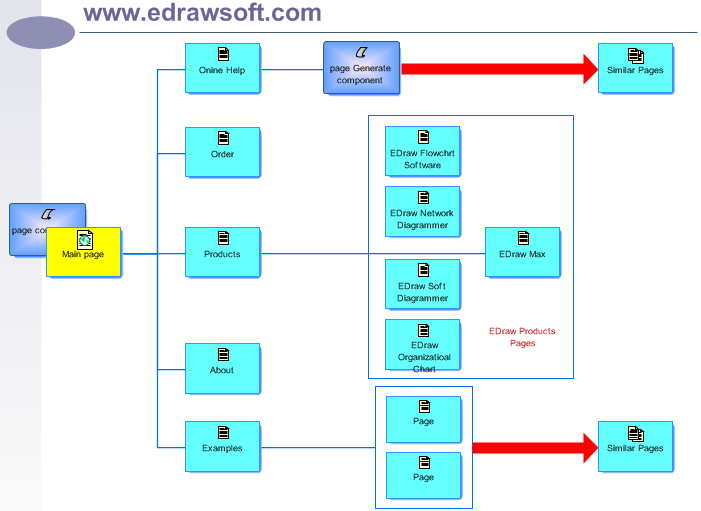
Wireframes

Wireframes
  • Wireframes are blueprints of a website.
  • Help you plan out the placement of the specific elements (logo, navigation, subnavigation, main content) on your page and well as map out how your page will function.
  • Wireframes are created before the actual layout design
  • Typically wireframes are non-graphical.


Week 3 - Classwork + Homework

Day  1
Quiz 3
Quiz on vocabulary and concepts from Security + Privacy and Copyright lectures.

Project 1
Research due today

Read:
Chapters 4-6 in textbook

Notebook Assignment 5 - Due: Sat., Oct.23
1. Pick a well designed informational website that has not been discussed in the class. (Do not pick types of sites that sell items—rather choose a site that simply informs users about a topic or service)

2. Based on the informational site chosen, answer the following questions in a word document:

• List the URL of the site
• What is the purpose of this site?
• Sketch out the main components (buttons, brand/logo, text boxes, graphic areas) for 3 different pages of your chosen site. You can copy + paste, but make sure you label each component.
• Identify at least 3 interactive design principles used in each page and explain how each principle was used effectively to communicate information, structure the information and/or to organized the content (be specific, give specific examples)
Due: Sat., Oct.23, at the beginning of class


Day 2
Project 1:
Bring your research to class
Complete writing for sections & descriptions
Finish your wireframe + flowchart
Design company logo
Begin screen page designs

Saturday, October 16, 2010

Flowcharts

Tuesday, October 12, 2010

Project 1 - Exotic Product Website


A. Objective 
Using Dreamweaver you will be creating a website for one of the following clients:
Exotic Fish Warehouse         OR      • Exotic Plant Nursery
You will need to come up with a color scheme, layout, and collect and prepare all the images and other appropriate content for the site. You are to create a main page, contact page, about page, and pages that showcase at least 20 types of exotic products (fish or plants, according to the client you choose). All these pages must link together.

Choose one of the following clients:
1. Client Name: Bluewater Exotics (exotic fish warehouse)
905 Hollywood Blvd
Hollywood, FL 33019
954-094-5769
fred@bluewaterexotics.us

2. Client Name: Palau Nursery (exotic plant nursery)
637 Haleakala Hwy
Kahului, HI 96732
808-200-4102
info@palaunursery.net


B. Technical Requirements
You must create pages that match the following criteria:

1) You must create and develop a company logo to be used on the site that incorporates the company’s product (via image cutout, illustration, etc.) into the logo. Use Photoshop and/or Illustrator. (keep it simple)

2) For the product page(s) you must include an image, and product information (general info, terminology, product care, etc.--which you should research and summarize in your own words) for each of the 20 products (animals, fish or plants) to be showcased on the site. DO NOT COPY AND PASTE YOUR RESEARCH FROM A PRE-EXISTING SITE, BOOK, RESOURCE, etc.

3) You must write and develop the about information for the company. Company info (who runs the company, what is their mission statement, etc. (can be fictional) Be creative. Use your imagination to provide appropriate company’s information for this page. (not too wacky if you want a portfolio piece because it will diminish the quality of your work)

4) You must cite your resources (websites, books, magazines, etc.) and type up and submit a bibliography for your research.

5) The owners of these companies want a sleek and contemporary look to their sites. The target audience for these web sites is adults (not children).


C. Due Dates
RESEARCH – content research and image collection due Wednesday, Oct. 20
FLOWCHART + WIREFRAME – due Wednesday, Oct. 27
DESIGN LAYOUT –Final designs due in PDF form on Saturday, Nov.6
ROUGH BUILD OF WEB PAGES – reviewed Saturday, Nov. 13
COMPLETED PROJECT (submit all workflow files and web documents) – due Saturday, Nov. 20

Website Project is worth 20% of your overall final grade for this class. Refer to grading rubric for grading criteria.

Copyright Resources

Week 2 - Classwork + Homework

Day 1
Bring to class
Photos to practice image optimization 

Review
Chapters 1-3 from textbook.

Study for Quiz (Day 2, Oct 16) on the following items:
Menu Bar (pg6)
Document Tool Bar (pg 7)
Property Inspector (pg 16)
Document View Modes (pg 10-13)
Insert Panel (pg 20)
Workspace (pg 22-24)
Local site vs. Remote site (pg 34-35)
What is an FTP?(pg 40)
Putting vs Getting Files(pg 53)
Creating a new page (pg 60)
Adding Titles, Text, Images, Making Links (pg 66-71)
NB_2 
Website Exercise 1 was due. If you were absent, submit your site folder to the AI Share drive>WDIM101_Fall10>NB_1> folder by the end of class. 

Privacy Resources
Attack of the Zombie Photos by Joseph Bonneau

Notebook Assignment 3 : Privacy + Safety

It is commonly considered stalking if someone sits outside of your house and watches you through binoculars.However, if someone were to constantly monitor your Facebook profile in attempt to track your personal activities and acquaintances, it may be difficult to explicitly label this activity as stalking. 

- In a 1 page response, address what you believe constitutes stalking in real life and what constitutes stalking of an online identity. Is it more difficult to label an action as a type of stalking when this action occurs online? Why? Give one example of one activity someone may take online that would be considered stalking by some and not stalking by others.

- Type and submit this essay at the end of class, or no later than the start of next class, Sat., Oct. 16


Day 2
Quiz Today 
Dreamweaver Basics

Bring to class
Photos to practice image optimization 
Read:
Chapters 4-6 from textbook.
Adding Text pg 87-109, 127
Adding Image + Image formats pg 129-133
Using Image backgrounds 154-155
Working with Links 165-169
Anchor names 175-177
Email links 181

Quiz 3 - Wed., Oct 20 
On vocabulary and concepts from Security + Privacy and Copyright lectures.

Project 1 - Website 
Research for all 20 products and image content due Wed., Oct. 20

Flowchart + Wireframe for Exotic Product website. Due Wed., Oct. 27
Wireframes + flowcharts can be digitally created (using Photoshop or Illustrator) or drawn by hand. Wireframes will help you figure out the layout, general structure and placement of logo, navigation, and content (images + text), etc.

Notebook Assignment 4
Write up a “how to” set of instructions for an activity or act that you can teach to a friend. Examples:
how to string a guitar,
how to knit a sweater,
how to wrap a present,
how to uninstall a program using Windows Vista.

Then translate those instructions into a very detailed flowchart. Be sure to use appropriate flowchart symbols (start/stop, actions, conditional statements that require YES or NO answer).

You may sketch out your flowchart on paper or make a digital file using Photoshop or Illustrator. If creating your flowchart digitally, save and submit file as a PDF & put it on the AiShare drive in our folder, then in the NB_4 folder.
Due: at the end of this class or before class begins on Wed., Oct 20.

Student flowcharts examples:

Sunday, October 3, 2010

Week 1, Classwork + Homework


History of the Internet from Melih Bilgil on Vimeo.

History of the Internet
W3 Internet History


Due Oct 9:
Notebook Assignment 1 - Why Web + Interactive Media?
Write a one page essay about why you are interested in working with interactive and web based mediums? Why did you choose to study WDIM over Graphic Design, Video or any other field? What draws you to computer based media work?
Type and submit this essay at the end of class, or no later than the start of next class, Saturday, Oct. 9, 1:00

Dreamweaver Intro
AdobeTV - Search videos + tutorials 
Lynda.com - What is Dreamweaver 
Lynda.com - Dreamweaver interface videos 
Dreamweaver basics - Setting up a site 
Dreamweaver basics - Defining a file structure 

 
Day 2
Quiz on Oct. 9
Study for quiz on Computer + Internet basics + History - Review the video + handouts. Bring your questions for a Q&A before the quiz.

Read:
The Web is Dead 
Chapters 1-3 in the textbook

Notebook Assignment #2: Website Exercise1: Due Today 
Based on what was introduced in class today, create a web site with the following criteria:
1. Site must consist of a home page (index.html) and 3 additional html pages
2. Add at least one image to each page (set up image file structure properly).
3. Add an attention grabbing headline to each page (use h1 tags)
4. Use the list button to display three facts about each image. Make essential keywords italicized and/or bold.
5. Modify the "title" of each page to be descriptive.
Submit your site folder to the AI Share drive>WDIM101_Fall10 – Website Exercise 1 folder by the end of class.